Opus 5 becomes the default Opus model, Claude Code Desktop adds an iOS Simulator pane, and the Claude Security plugin scans your code for vulnerabilities.
Claude Opus 5 is the new default Opus model in Claude Code. It's the default on Max, Team Premium, Enterprise pay-as-you-go, and the Anthropic API, and on Claude Platform on AWS, Amazon Bedrock, and Google Cloud's Agent Platform. On the Anthropic API and on Max, Team, and Enterprise plans, Opus 5 runs with a 1M-token context window; on Amazon Bedrock and Google Cloud's Agent Platform, select the 1M model variant. Fast mode moves to Opus 5 at \$10/\$50 per MTok. Requires v2.1.219 or later.
Switch to Opus 5 by name, or pick it from the model picker:
> /model claude-opus-5
Claude Code Desktop on macOS gets an iOS Simulator pane, in public beta on Pro, Max, and Team plans. When Claude builds, launches, or checks your app in a simulator, the pane opens next to the conversation and streams the device screen live, so you can watch Claude tap through the app to verify its changes or drive the device yourself. Requires Xcode with the iOS platform installed, and Claude Desktop v1.24012.0 or later.
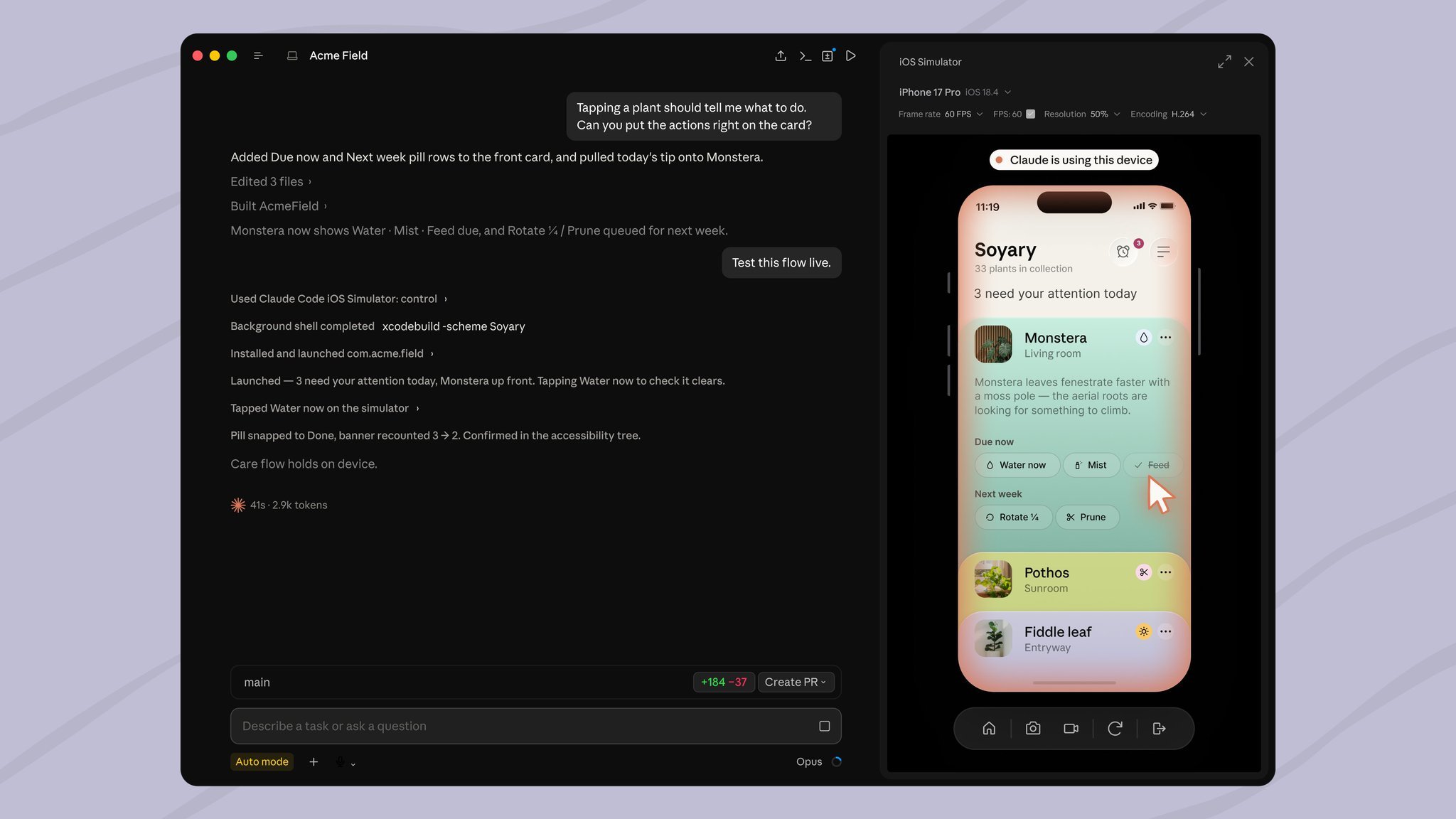
Ask Claude to run or test your app, and the pane opens when the app launches:
> Build the app and run it in the simulator to check the onboarding flow.
The Claude Security plugin runs a multi-agent vulnerability scan of your codebase inside a Claude Code session: agents map your architecture, build a threat model, hunt for vulnerabilities, and independently review every finding before writing the report to a CLAUDE-SECURITY-\ directory. Scan a whole repository or only a branch's diff, a pull request, or a single commit, then turn the findings you choose into reviewed patches that you apply yourself.
Install the plugin from the official Anthropic marketplace, run /reload-plugins, then start a scan with /claude-security:
> /plugin install claude-security@claude-plugins-official
Other wins
/code-review now runs as a background subagent with its own context window, so review work stays out of your conversation and the findings arrive when it completes/verify, /code-review, and /deep-research run only when you invoke them; Claude no longer launches them on its own:heart: to insert an emoji, or two or more characters after : for suggestions; turn it off with emojiCompletionEnabledcontext: fork run in the background by default, and background: false in the skill's frontmatter waits for the result in the same turnCLAUDE\_CODE\_MAX\_CONCURRENT\_SUBAGENTSsandbox.filesystem.disabled setting skips filesystem isolation while keeping network egress controlrm commands, background jobs, and suspicious Windows paths no longer open permission dialogs; the auto-mode classifier adjudicates them instead\[\[ ]] comparisons, help and man invocations that could run unsafe options, and commands over 10,000 characters/fast now applies to Opus 5 and Opus 4.8